Free Shopify Site Audit
Enter your store or sitemap URL to quickly find what SEO issues are holding it back.
How does it work?
The Shopify site audit tool scans your store’s sitemap.xml file, checks the HTML of up to 50 pages from your store’s main market, and runs on-page SEO checks on each one. You get a quick overview of all checks grouped by their severity (critical, warning, and notice), with the number of issues found for each.
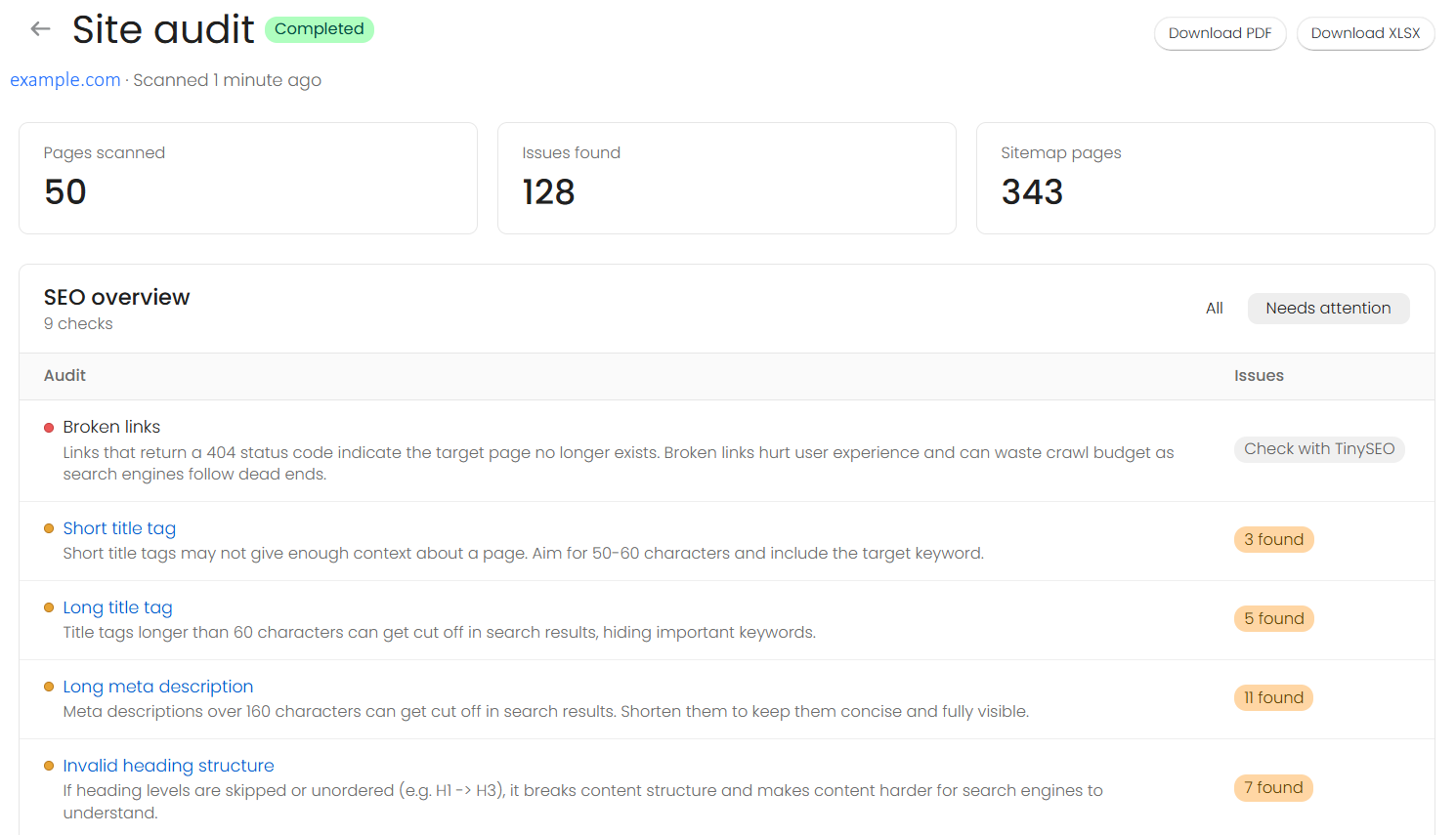
If you click any check that has detected issues, you’ll see a list of affected pages, so you can find what to fix faster. And if you want to focus on a specific page, click on any of the listed pages to get a full report with its images, links, meta tags, and headings.
The tool can’t audit password-protected stores, and if the same store was audited in the last 24 hours, you’ll see that report instead of starting a new crawl.
How to audit a Shopify store?
01Enter your store’s URL (or sitemap URL) into the site audit tool.
02Click Audit site and wait for the scan to complete.
03Review the issues and download the report.

Fix your Shopify SEO issues faster with bulk edits and automated, one-click features
Install TinySEO (opens in a new tab)
What does the site audit check?
The site audit tool runs each page through SEO checks that are available without installing the TinySEO app, covering meta tags, headings, images, indexing, and more. Checks marked TinySEO app need deeper scans, so they can only run in the app, not in the free scan.
Meta tags
8 checksTitle tag
The clickable headline in search results. Keep it 50-60 characters, include the target keyword, and make it unique on every page.
Meta description
The short summary of your page under the title tag. Without one, Google writes its own. Keep it 150-160 characters and make it unique.
Headings
5 checksH1 tag
Each page should have one H1. It should be unique so search engines can tell your pages apart.
Heading structure
Ordered, non-empty headings help search engines and readers follow the page.
Content and images
4 checksContent
Pages with little text rarely rank, and Googlebot may crawl only the first 2 MB of HTML.
Images
Large images can slow pages down, while alt texts are helpful for image search.
Indexing and structured data
7 checksIndexing
Pages shouldn’t be hidden from search engines, and each page should have a preferred version so duplicates don’t compete.
Structured data
Structured data (schema) without duplicates improves your chances of rich results, like price and reviews.
Page setup
A viewport tag keeps pages mobile-friendly, while HTTPS-only content prevents browser security warnings.
Links and URLs
4 checksLinks
Nofollow tags on internal links stop them from passing ranking value, while broken links can increase bounce rates.
URLs
Short, readable URLs are easier to understand, scan in search results, and share.
How to fix site audit issues?
Filter the site audit issues by “Needs attention” and start from the critical ones. Click the issue you want to investigate to get a list of affected pages and exact issues. Most SEO issues are easy to fix through Shopify Admin, while others may require theme edits.
In Shopify Admin:
- Titles and meta descriptions – open the page you want and click Edit under the Search engine listing section.
- Missing alt text – click on the image in your files or content and edit the Alt text field.
- Heading issues – delete empty heading tags from content or fix heading hierarchy.
- Open Graph tags – usually generated from your page title, description, and feature image, so fix them.
- Broken links – go to Content > Navigation > URL redirects and set up a redirect.
- Long or messy URLs – open a page and edit the URL handle under Search engine listing.
In your theme:
- H1 issues – usually set by the theme templates, so contact your theme developer.
- Missing viewport – may be caused by an outdated theme or a custom edit, so check your code.
- Canonical tags – outdated or custom themes may need adding the tag in your theme code.
- Schema markup – add structured data to your store through coding or using an app.
- Noindex tags – remove from pages you want to appear in search engines. Requires coding or an app.
- Robots.txt blocks – if unintentional, edit the robots.txt.liquid template in your theme code.
Stores with hundreds of pages can use the TinySEO app, which allows editing metadata and alt texts in bulk, adding schema markup, and auditing your whole store, including for broken links.
Why audit a Shopify store?
Themes, apps, and bulk edits change your store’s HTML all the time, and most on-page SEO problems are invisible in the storefront. A site audit detects all issues before they cost you rankings:
- Rank for the right keywords. Title tags and meta descriptions are what search engines like Google show in search results. Missing, truncated, or duplicate ones can lose clicks.
- Keep pages crawlable and indexable. A stray noindex tag, a robots.txt rule, or a missing canonical tag can quietly remove products and collections from search.
- Win the click on social. Open Graph title, description, and image decide how your pages look when shared on Facebook, LinkedIn, Slack, or WhatsApp.
- Catch regressions early. Re-run the audit after a theme update or a new app to make sure no new issues arise.

Social sharing
3 checksOpen Graph tags
They control how your page looks when shared on Facebook, LinkedIn, or in chat apps.